Skip to main content

- Go to homepage
- Study
- Get started
- Password reset
Reset your password
If you forget your TAFE NSW account password, follow the steps below to reset it.
Please note you can only reset your password once every 24 hours using the self service option. After that you will need to call our helpline.
If you know your password but would like to change it, see how to Change a known password.
Before you start
If you have multifactor authentication set up, you’ll need access to your device. Otherwise, you’ll need access to the personal email account you used to set up your TAFE account. We’ll send you an email with a security code that you’ll need to reset your password.
How to reset your password
Resetting your TAFE NSW password is simple. Watch this step-by-step video to learn how.
Step 1
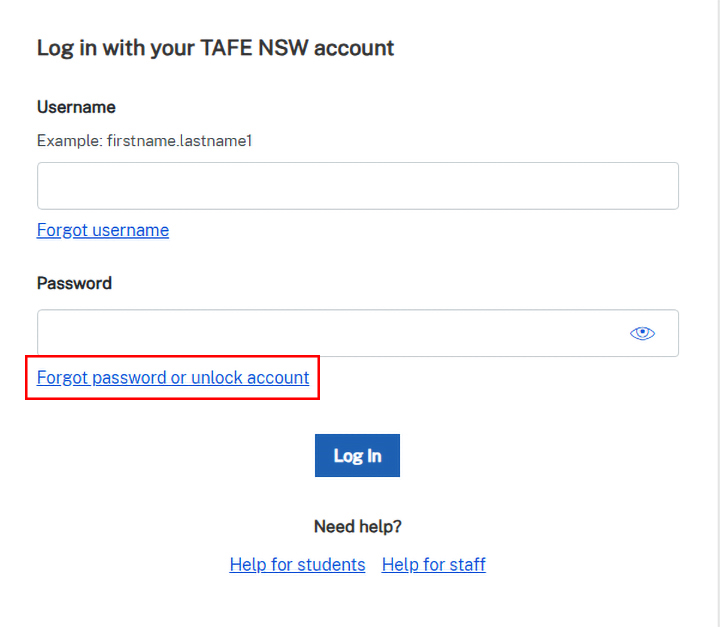
Go to the TAFE NSW login page.
Click the ‘Forgot password or unlock account’ link.
Step 2
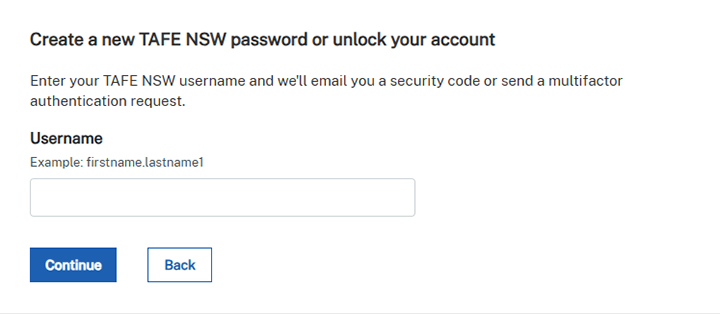
Enter your TAFE NSW username and click ‘Continue’.
If you’ve forgotten your username, you can Find your username.
Step 3
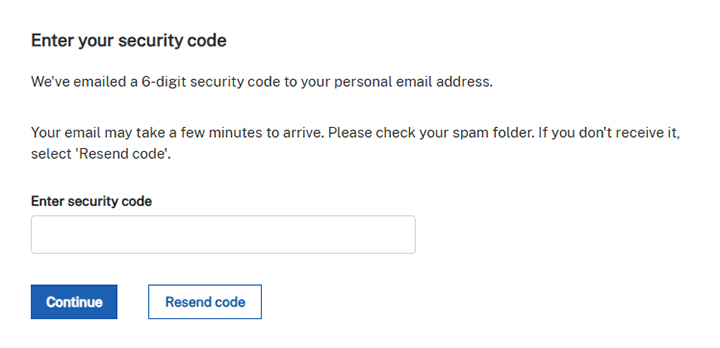
Open the personal email account you used to set up your TAFE account. You’ll receive an email from TAFE NSW with a 6-digit security code. If you can’t see it in your inbox, check your spam folder.
If you don’t have an email from us:
- it may be in your spam folder
- you may have used the wrong email address (if you have more than one personal email account)
- you may have mis-typed the right email address.

Step 4
Enter the 6-digit security code and click ‘Continue’.
Step 5
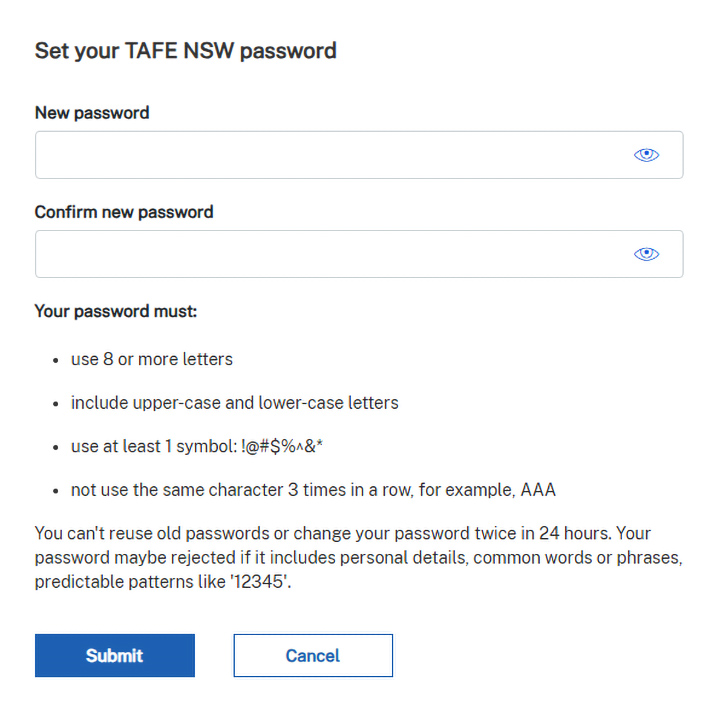
Enter your new password in the ‘New password’ and ‘Confirm your password’ fields.
Make sure your new password:
- uses 8 or more characters
- includes upper-case and lower-case letters
- uses at least one symbol: !@#$%^&
- does not use the same character 3 times in a row, for example, AAA.
Step 6
If your reset was successful, you’ll see a ‘We’ve updated your password’ message.

Avoid account lockouts
To avoid your account locking, go into your wi-fi settings to remove or ‘forget’ and reconnect to the TAFE NSW wi-fi using your new password. Visit our Library services website to learn how to forget a wi-fi network on your device.
This will preventyour device from trying to connect to campus wi-fi using your old password next time you’re on campus.
If your account has locked, find out how to unlock your account.
Explore more
Change a known password
If you know your TAFE NSW account password but need to change it, follow these steps.
Find your username
If you can’t remember your TAFE NSW username, find out how to recover it.
Unlock your account
If your account is locked, wait for 20 minutes or find out how to unlock your TAFE NSW account.
We’re here to help
If you need help resetting your password, contact Student Services on 131 601.